Fix volume adjustment steps on Manjaro Cinnamon
- Date Created
- Date Modified
Changes in Cinnamon 6.4
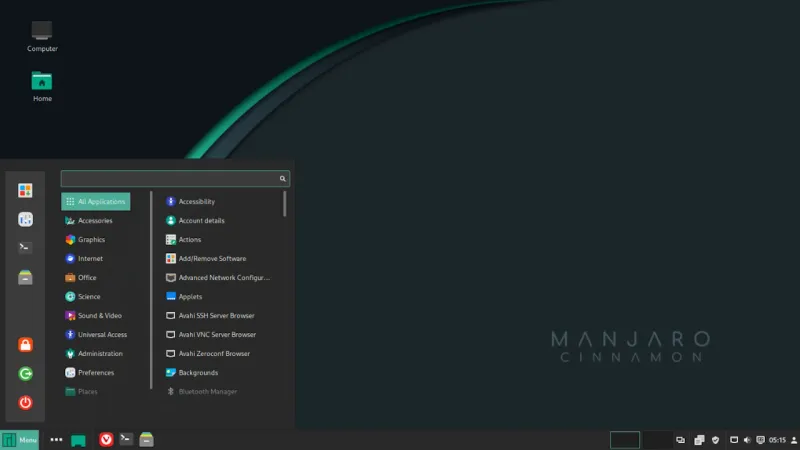
Official image picture of Manjaro Cinnamon
Around the beginning of last December, Manjaro’s Cinnamon was updated to the 6.4 series, and a lot has changed.
Personally, I was concerned about the fact that the volume steps are now fixed at by 5% each. This 5% value is hard-coded into the source code and cannot be changed.
So I decided to modify the package and re-install it. The environment is Manjaro Cinnamon, but I think the procedure is applicable to all Arch distributions.
Procedure
The procedure is as follows:
Obtain and modify source files
Obtain and modify the PKGBUILD
Modify the checksum of the package
Build and install
Since Cinnamon is a desktop environment developed by Linux Mint, almost all of the information found is for Mint and cannot be applied directly to Arch. However, the procedure remains the same: modify the source code of the package, build it, and reinstall it.
When building Arch packages, a bash script called PKGBUILD is used, which contains information necessary for installation, such as the location of source files and dependency information, and all the packages can be managed by pacman if only the PKGBUILD is ready. I think this is one of the good points of Arch.
Obtain source files and modify
You can easily find upstream repository from package detail page
Git clone in an empty directory, since there will be more miscellaneous files later on.
$ mkdir csd
$ cd csd
$ git clone https://github.com/linuxmint/cinnamon-settings-daemon
The file to be modified is
csd-media-keys-manager.c in
cinnamon-settings-daemon > plugins > media-keys.
Change VOLUME_STEP from 5 to any value. This
time, I set it to 1, which was the default before.
#define VOLUME_STEP 1Save and exit.
Now compress the directory into tar.gz format.
$ tar -czvf cinnamon-settings-daemon.tar.gz cinnamon-settings-daemonObtain PKGBUILD and modify
PKGBUILDs can also be found through the link Source Files on the package detail page.
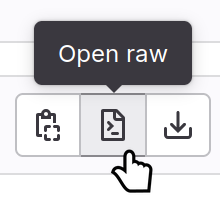
After you find a PKGBUILD, click the button on the right side of the page to display the source file, then download its URL using wget. (Alternatively, you can press Ctrl + S to save it in your browser.)
First, since it builds from local files, ensure that
source=("${pkgname}.tar.gz") is always used. Also,
be careful that there are no version-specific references like
${pkgname}-${pkgver} throughout the file.
$ wget "https://gitlab.archlinux.org/archlinux/packaging/packages/cinnamon-settings-daemon/-/raw/main/PKGBUILD"After downloading with wget, rewrite the directory names of
source as follows.
# Maintainer: Bruno Pagani <archange@archlinux.org>
# Contributor: Eli Schwartz <eschwartz@archlinux.org>
# Contributor: Alexandre Filgueira (faidoc) <alexfilgueira@antergos.com>
# Contributor: Jan Alexander Steffens (heftig) <jan.steffens@gmail.com>

pkgname=cinnamon-settings-daemon
pkgver=6.6.2
pkgrel=1
pkgdesc='Settings daemon for Cinnamon'
arch=(x86_64)
url='https://github.com/linuxmint/cinnamon-settings-daemon'
license=('GPL-2.0-or-later AND LGPL-2.0-or-later')
depends=(
  cairo
  cinnamon-desktop
  dconf
  fontconfig
  gcc-libs
  gdk-pixbuf2
  glib2
  glibc
  gtk3
  hicolor-icon-theme
  lcms2
  libcanberra-pulse
  libcolord
  libcups
  libgudev
  libnotify
  libwacom
  libx11
  libxext
  libxi
  nspr
  nss
  pango
  polkit
  pulse-native-provider
  systemd-libs
  upower
)
optdepends=('cinnamon-translations: i18n')
makedepends=(
  git
  glib2-devel
  meson
)
# ↓ change this line
# source=("git+https://github.com/linuxmint/cinnamon-settings-daemon.git#tag=$pkgver")
source=("${pkgname}.tar.gz")
# ↓ this line will be overwritten in next step
b2sums=('177f73765b4788ce41243c82090acd47f372496c4364c3818186695e0ad9002911fd9f41ae24192799d1692c27d9601745762a76ffd1d339b54fcfee09d8a99c')

build() {
  arch-meson $pkgname build \
    --libexecdir=lib/$pkgname
  meson compile -C build
}

package() {
  meson install -C build --destdir="$pkgdir"
}
Now save changes.
Change checksums
Generate new chacksum of the package by
makepkg -g
$ makepkg -g
==> Retrieving sources...
  -> Found cinnamon-settings-daemon.tar.gz
==> Generating checksums for source files...
b2sums=('b31dccff126dba8823089d883380eccff0da7ae40609c6b648c67a06e37057656ece7482f7c00cf80830d95e6f91d510b86f1619e5754b02a729582046f78ed9')
Now copy this b2sums and paste it to replace the
line of b2sums=('......') in PKGBUILD.
ArchWiki guides you to use updpkgsums, a useful
tool included in pacman-contrib to update
checksums, but I got an error if the package contains CR+LF as
follows.
$ updpkgsums cinnamon-settings-daemon.tar.gz
/usr/bin/makepkg: line 1255: warning: command substitution: ignored null byte in input
==> ERROR: cinnamon-settings-daemon.tar.gz contains CRLF characters and cannot be sourced.
==> ERROR: Failed to generate new checksums
I found out it does indeed contain CR+LF by
grep.
$ grep -lzUP '\r\n' ./*
=> cinnamon-settings-daemon.tar.gz
However, I can’t find it in the source files, and I can’t build it by removing it with sed, so I gave up dealing with it this time.
I will investigate the cause of this error when I have free time. The road to becoming a beginner Linuxer is a far long one.
Build and install
After applying the new checksum to the PKGBUILD, it can be
built and installed with makepkg -si.
$ makepkg -siIf you get the following error, the directory name of
build() is still ${pkgname}-${pkgver},
which is different from the directory name of the
git clone, so modify the PKGBUILD to be only
${pkgname}.
ERROR: Neither source directory 'cinnamon-settings-daemon-6.4.3' nor build directory 'build' contain a build file meson.build.
==> ERROR: A failure occurred in build().
    Aborting...
Fix OSD window to display volume percentage.

In the new Cinnamon, the OSD window in front of the window no longer displays the volume percentage. Let’s fix it as well.
$ sudo cp /usr/share/cinnamon/js/ui/osdWindow.js /usr/share/cinnamon/js/ui/osdWindow.orig
$ sudo nano /usr/share/cinnamon/js/ui/osdWindow.js
Put this.setLabel(value.toString() + ' %'); in
the line next to if (this._level.visible) {
setLevel(value) {
    this._level.visible = value != null;
    if (this._level.visible) {
        /* ↓ Put this line */
        this.setLabel(value.toString() + ' %');
        /* ↑ Put this line */
      value = value / 100;
        if (this.visible)
            this._level.ease_property('value', value, {
                mode: Clutter.AnimationMode.EASE_OUT_QUAD,
                duration: LEVEL_ANIMATION_TIME,
            });
        else
            this._level.value = value;
    }
}
Then restart cinnamon.
$ cinnamon-dbus-command RestartCinnamon 1
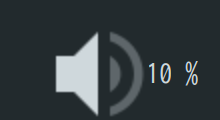
Now it’s done.
P.S.() : The style was not applied correctly, and the volume bar was not displayed.
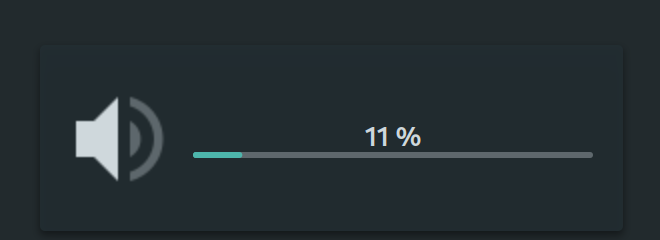
When displayed correctly, it should look like this.
Websites I reffered
License Information

Fix volume adjustment steps on Manjaro Cinnamon is licensed under a Creative Commons [Attribution 4.0 International] License.